 Frustrated by Magento? Then you’ll love
- Magento Front Controller
- Reinstalling Magento Modules
- Clearing the Magento Cache
- Magento’s Class Instantiation Abstraction and Autoload
- Magento Development Environment
- Logging Magento’s Controller Dispatch
- Magento Configuration Lint
- Slides from Magento Developer’s Paradise
- Generated Magento Model Code
- Magento Knowledge Base
- Magento Connect Role Directories
- Magento Base Directories
- PHP Error Handling and Magento Developer Mode
- Magento Compiler Mode
- Magento: Standard OOP Still Applies
- Magento: Debugging with Varien Object
- Generating Google Sitemaps in Magento
- IE9 fix for Magento
- Magento’s Many 404 Pages
- Magento Quickies
- Commerce Bug in Magento CE 1.6
- Welcome to Magento: Pre-Innovate
- Magento’s Global Variable Design Patterns
- Magento 2: Factory Pattern and Class Rewrites
- Magento Block Lifecycle Methods
- Goodnight and Goodluck
- Magento Attribute Migration Generator
- Fixing Magento Flat Collections with Chaos
- Pulse Storm Launcher in Magento Connect
- StackExchange and the Year of the Site Builder
- Scaling Magento at Copious
- Incremental Migration Scripts in Magento
- A Better Magento 404 Page
- Anatomy of the Magento PHP 5.4 Patch
- Validating a Magento Connect Extension
- Magento Cross Area Sessions
- Review of Grokking Magento
- Imagine 2014: Magento 1.9 Infinite Theme Fallback
- Magento Ultimate Module Creator Review
- Magento Imagine 2014: Parent/Child Themes
- Early Magento Session Instantiation is Harmful
- Using Squid for Local Hostnames on iPads
- Magento, Varnish, and Turpentine
This is less a full fledged article this time, and more “something I always forget and can never find anywhere else, so I’m posting it here to help future me”.
When you’re packaging up a Magento Extension for distribution through Magento Connect
System -> Magento Connect -> Package Extensions
You need to create a list of Roles and Path pairs
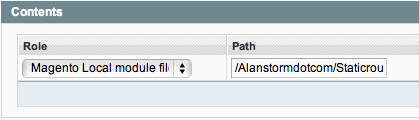
The first time you do this, it’s not entirely obvious what a Role or a Path is. If you expand the Role drop-down, you get a list of different file types.

A Role defines (and labels) a certain sub-directory in your Magento install. The following Role/file-path pairs were valid for Magento 1.4.1.
- Magento Local module file: ./app/code/local
- Magento Community module file: ./app/code/community
- Magento Core team module file: ./app/code/core
- Magento User Interface (layouts, templates): ./app/design
- Magento Global Configuration: ./app/etc
- Magento PHP Library file: ./lib
- Magento Locale language file: ./app/locale
- Magento Media library: ./media
- Magento Theme Skin (Images, CSS, JS): ./skin
- Magento Other web accessible file: .
- Magento PHPUnit test: ./tests
- Magento other: .
A Path defines a file path, from the base of the Role, to include in your packaged module.
Whenever I go to create a new Connect package, I always have to glop through the code to figure out which sub-directory a Role corresponds to. The last tie this happened I hacked together the following script to grab and display that information.
File: roles.php (in the root magento directory)

/**
* Jumps into PEAR files to figure out what paths the connect roles belong to
* worked on the 1.4.1 release, and I almost guarantee it'll break in a future
* release.
*/
function main()
{
    $paths  = get_key_path_pairs();
    $labels     = get_labels();
    render_labels_paths($paths, $labels);
}

function render_labels_paths($paths, $labels)
{
    foreach($labels as $key=>$value)
    {
        echo $labels[$key] .
        "\t:\t" .
        $paths[$key] .
        "\n";
    }
}

function load_roles()
{
    $inner = '';
    foreach(glob('downloader/pearlib/php/PEAR/Installer/Role/*.xml') as $file)
    {
        $inner .= file_get_contents($file);
    }
    $xml = '<roles>'.$inner.'</roles>';
    return simplexml_load_string($xml);
}

function get_key_path_pairs()
{
    $pairs = array();
    foreach(load_roles() as $role)
    {
        $location_config = (string) $role->locationconfig;
        if($role->config_vars->{$location_config}->type &&
        $role->config_vars->{$location_config}->type == 'directory')
        {
            $path = (string) $role->config_vars->{$location_config}->default;
            $pairs[$location_config] = $path;
        }
    }
    return $pairs;
}

function get_pair_roles()
{
    set_include_path('downloader/pearlib/php');
    require('downloader/pearlib/php/PEAR/Command/Mage.php');
    $fake         = null;
    $command     = new PEAR_Command_Mage($fake,$fake);
    return $command->getRoles();
}

function get_labels()
{
    $labels = array();
    foreach(get_pair_roles() as $option=>$info)
    {
        if(array_key_exists('name', $info))
        {
            $labels[$info['dir_config']] = $info['name'];
        }
    }
    return $labels;
}

main();